1.首先前端需要配置请求拦截器
目的:保证登录了的用户发起的每一次请求都会携带token,而不用每次都自己添加,在request.js里面添加
// 添加请求拦截器
service.interceptors.request.use(config => {// 1. 从 sessionStorage 拿到登录时存的 tokenconst token = sessionStorage.getItem("token");// console.log(token)// 2. 如果 token 存在,就塞进 Headerif (token) {// 注意:后端 Spring Security 通常要求加 "Bearer " 前缀(带空格)config.headers['Authorization'] = 'Bearer ' + token;}return config;
}, error => {return Promise.reject(error);
});
2.编写后端过滤器
过滤器的作用是:大门口的保安,负责安保(Token校验、编码)。
拦截器的作用是:办公室的秘书,负责接待(权限检查、记录到底见了谁)。
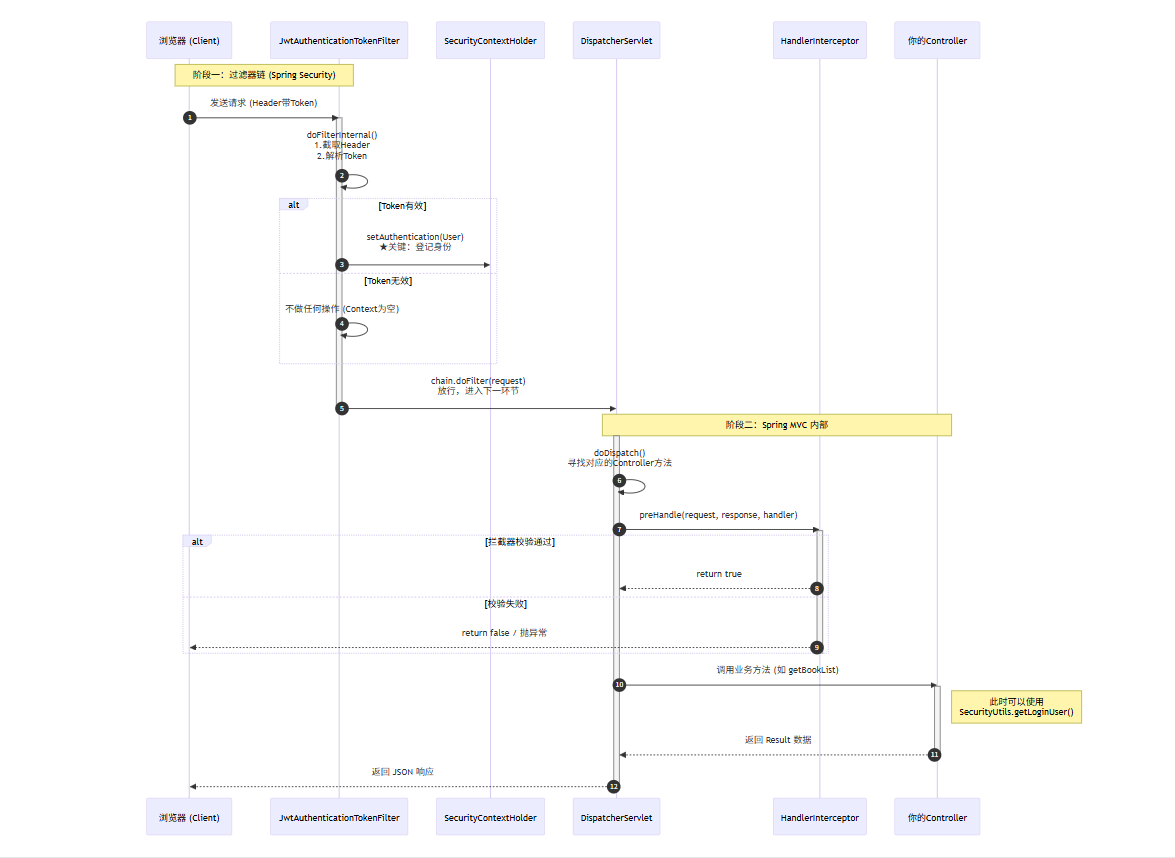
JwtAuthenticationTokenFilter源码
@Component
public class JwtAuthenticationTokenFilter extends OncePerRequestFilter {@Overrideprotected void doFilterInternal(HttpServletRequest request, HttpServletResponse response, FilterChain filterChain)throws ServletException, IOException {// 1. 从请求头获取 AuthorizationString authHeader = request.getHeader("Authorization");// 2. 判断是否以 "Bearer " 开头if (authHeader != null && authHeader.startsWith("Bearer ")) {// 截取掉前7个字符 "Bearer "String token = authHeader.substring(7);try {// 3. 解析 Token 拿到用户 IDLong userId = JwtUtils.getUserIdFromToken(token);if (userId != null && SecurityContextHolder.getContext().getAuthentication() == null) {// 4. 将用户信息封装,存入 Spring Security 上下文UsernamePasswordAuthenticationToken authentication =new UsernamePasswordAuthenticationToken(userId, null, null);SecurityContextHolder.getContext().setAuthentication(authentication);}} catch (Exception e) {// Token 无效或过期,这里可以选择记录日志或静默处理(让 Security 后续拦截)}}// 5. 放行,交给下一个过滤器或 ControllerfilterChain.doFilter(request, response);}
}
3.配置 Spring Security
1.为什么 Spring Security 默认开启 Session?
因为 Spring Security 诞生得很早。在那个年代(10 年前),绝大多数网站都是JSP或者Thymeleaf这种模式。
在这种老模式下,服务器必须记住用户。比如你逛淘宝,购物车里的商品,在还没结账前,通常就是临时存在 Session 里的。如果不开启 Session,你点到下一页,购物车就空了,那还怎么买东西?
.sessionManagement().sessionCreationPolicy(SessionCreationPolicy.STATELESS)这句话的意思是:“大爷,别去开柜子了,我们这家店只认票,不存衣服。”
2.告诉保安“哪些门不用查票” (白名单机制)
-
如果没有配置 (.antMatchers("/login").permitAll()): 请求到达你的过滤器,过滤器发现没 Token,Context 为空。 接着 Security 发现用户没登录,直接拦截。 结果:用户永远无法访问登录接口,永远拿不到 Token,变成了死循环。
-
配置的作用: 它告诉 Security 框架:“大哥,这个 /login 接口是办证大厅,谁都可以进,你千万别拦着,也不用查票。”
3.关闭“老旧的安保系统” (默认行为覆盖)
Spring Security 是一个很老牌的框架,它的默认行为是为“网页版系统”设计的,并不适合咱们这种“前后端分离 + JWT”的系统。如果你不配置,它会给你捣乱:
- 它默认会开启 Session: 也就是它想在服务器内存里记住用户。但咱们用 JWT 就是为了不占内存(无状态)。 配置:.sessionManagement().sessionCreationPolicy(SessionCreationPolicy.STATELESS) —— 告诉它:“别记性太好,我们要像鱼一样,只有7秒记忆,每次都重新查 Token。”
- 它默认会开启 CSRF 防御: 这是一个针对 Cookie 的防护机制。咱们用 Token,根本不需要这个。如果不关掉,前端发 POST 请求会一直报错。 配置:.csrf().disable() —— 告诉它:“把防盗门撤了,我们不需要这个。”
- 它默认会弹出一个很丑的登录框: 如果你没传 Token,它默认会把你重定向到一个 HTML 登录页。咱们做接口开发的,前端只需要 JSON,不需要 HTML。 配置:.formLogin().disable() —— 告诉它:“别给我弹网页,直接报 403 错误就行。”
4.把你的“临时工”转正 (注册过滤器)
虽然写好了 JwtAuthenticationTokenFilter 这个类,但在 Spring Security 的眼里,它只是一个普通的 Java 类,还在路边站着呢,没在岗位上。Spring Security 内部有一条长长的默认过滤器链(比如自带的密码校验过滤器 UsernamePasswordAuthenticationFilter)。
.addFilterBefore(jwtAuthenticationTokenFilter, UsernamePasswordAuthenticationFilter.class)
作用:强行插队。 意思是:“把你自带的那个只会查 Session 的过滤器往后稍稍,先把我的这个查 Token 的过滤器插在前面!”如果不写这句配置,过滤器代码写得再花哨,永远都不会被执行。
SecurityConfig配置类完整代码
@Configuration
@EnableWebSecurity
public class SecurityConfig extends WebSecurityConfigurerAdapter {@Autowiredprivate JwtAuthenticationTokenFilter jwtAuthenticationTokenFilter;@Beanpublic BCryptPasswordEncoder passwordEncoder() {// BCrypt 每次加密生成的盐都是随机的,安全性极高return new BCryptPasswordEncoder();}// 2. 配置接口放行逻辑@Overrideprotected void configure(HttpSecurity http) throws Exception {http// 1. 关闭 CSRF (跨站请求伪造防护),因为我们使用 JWT.csrf().disable()// 必须添加这一行,开启 Spring Security 对跨域的支持,不然没有走到全局跨域请求就被这个保安打回去了.cors().and().sessionManagement().sessionCreationPolicy(SessionCreationPolicy.STATELESS).and()// 2. 配置接口放行逻辑.authorizeRequests()// 允许匿名访问的接口:登录、注册、验证码等.antMatchers("/api/auth/**", "/api/user/**","/profile/**","/uploads/**","/api/pay/**").permitAll()// 其他所有接口都需要 Token 验证.anyRequest().authenticated().and()// 3. 这里的关键:把我们的 JWT 过滤器放在系统默认的登录过滤器之前.addFilterBefore(jwtAuthenticationTokenFilter, UsernamePasswordAuthenticationFilter.class);}
}