Story VUEDPI-3838: Ability to restart specific program container from a specific Splicer/RC
Story Summary: As a DTV operator, I want the ability in the VUE Manager UI to restart specific program container from a specific splicer. Since the splicer works as 1:1 redundancy cluster, this operation should provide me the option to restart the program on specific node or both nodes when triggered. This will be used during troubleshooting when a program is not outputting or not splicing at a VHO.
Background:
- Previously in VUEDPI1.0 or later releases, EM only does pushing the setting such as Mapping, Zones, splicing params and latency etc , to Splicer via Redis queue, and the setting will be circulate in all Splicer component without expecting an immediate result. This is the first time related to EM fire a command to Splicer and Splicer need to execute on the it and ideally to return a execution result to the EM.
- Kumar propose to have a dedicated module / service to host this type of command handler for future extension
Frontend:
- Since the VSP restart is base on 2 factors : Program , Splicer and Nodes, UDP mapping UI will be entry point for end user to access to this feature

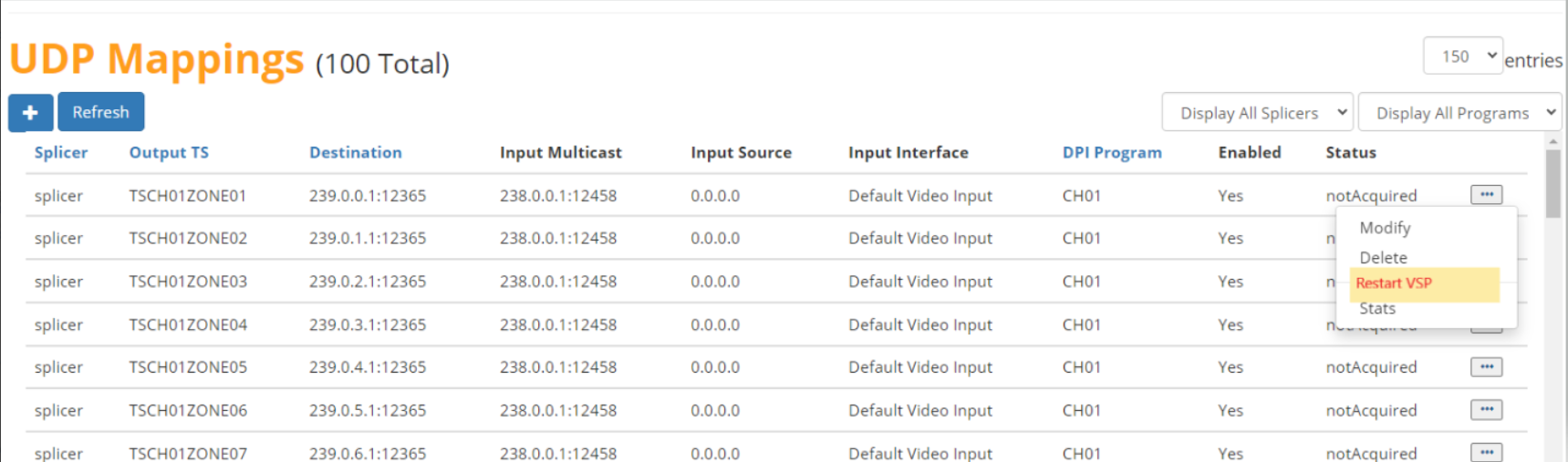
- Pop up page goes here, in theory it should support node multi selection within the same splicer (TO BE PROVIDED)
TBD
Backend:

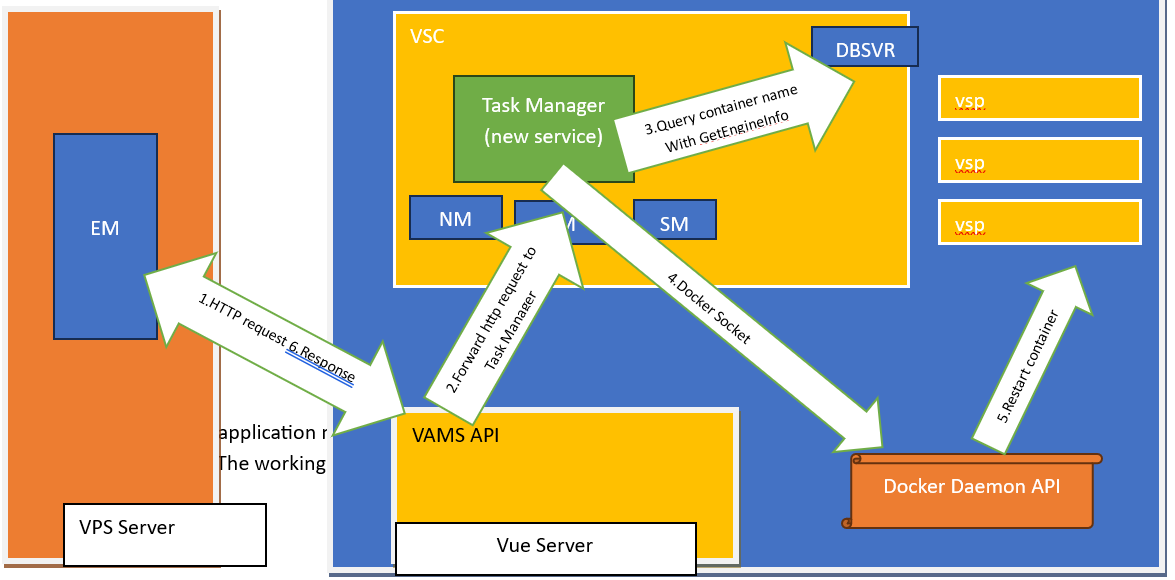
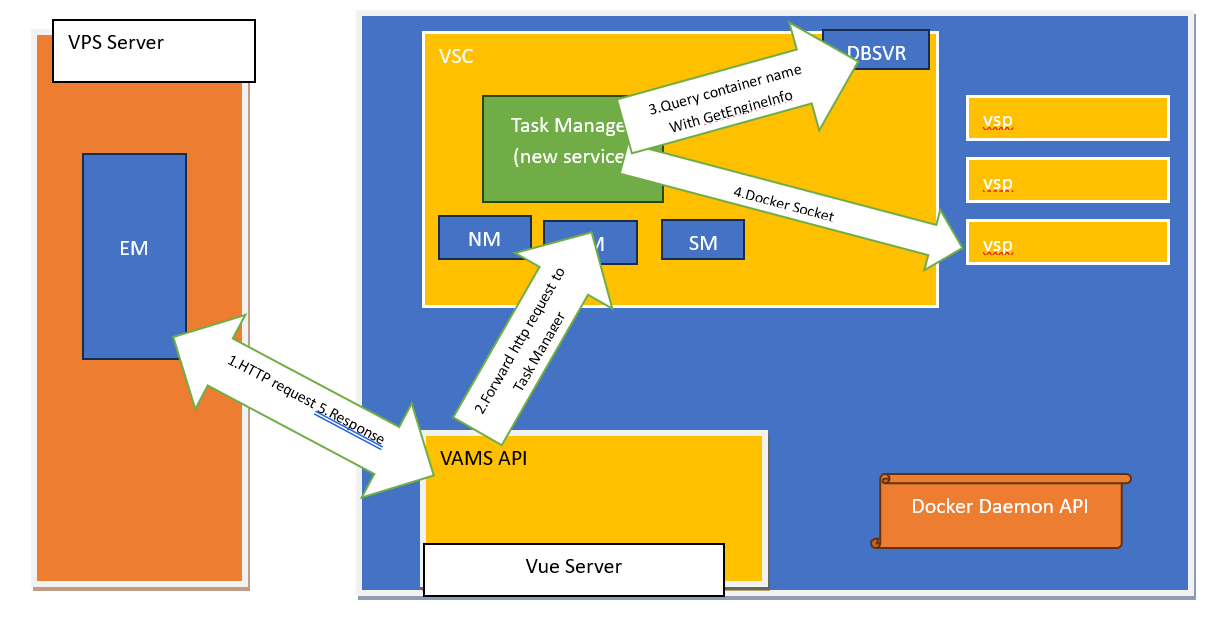

Work Breakdown and Estimation
| UI | 2 | Emmy | |
| Controller | 1 | Emmy | |
| VAMS | 2 | Terry | |
| Task Manager | 4 | inside VSC | Richard |
| New redis table track docker id/program association | 2 | Terry | |
| Docker Socket | 2 | Richard | |
| Platform | 2 | Moon | |
| Developer Intergration Test | 2 | ||
| Bug fixes | 2 | ||
| QA | 2 | Stephen |
Staffing
3 developers, 1QA
Summary:
Developer: 21 manweeks + 2 (buffer) = 23 manweeks
QA: 2 manweeks + 1 (buffer) = 3 manweeks
Total: 6 manmonths
Calendar schedule:
Development : 2.75 months
QA: 0.75 months
Total: 3.5 months
Technology options
-
gRpc vs webhook
- Webhook automate communication between application programming interfaces (APIs) and can be used to activate workflows, such as in GitOps environments.,
- one well known example is with CICD pipeline when Bitbucket (source code repo)is getting new code merged, it will send out notification to Jenkin server to pull Bitbucket’s latest code for other pipelined activities such as complication or deployment. after code change notification.
- Pub / Sub api are in different work context, challenges for UI request / response model.
- Good for use case such as live update of vue server stat / parameter changes to VPS side
- Example code for webhook goes here.
- gRpc (Google Remote Process Call) is created by google in 2016,
- it support cross platform method invocation and program language agnostic,
- it leverage HTTP2.0 to transmit payload in binary format and inherently support the request/response model. with this implementation mainly EM/Controller can fireup a request to Task Manager process in VSC to execute a task and returns the result in the same call.
- It doesn’t requires the service to have Http Server installed.
- Security wise we can add secret/passwrod for the authentication. Example code for gRpc goes here.
- Example code for webhook goes here.
- Both of them will be new tech set for our future architecture stacks kit.
- For this requirement, we inclined to use gRpc as it support request / response model most of UI user experience scenario.
- Webhook automate communication between application programming interfaces (APIs) and can be used to activate workflows, such as in GitOps environments.,
-
new process / service (Task Manager) hosted by VSC
- Should be C++ base new application / process similar with PM, SM, RM
- Process Monit should be augmented manage its life cycle and reboot on faulty state similar to other manager processes
-
Docker Socket
- Task manager will reuse GetEngineInfo script to query DBSvr to acquire container name given the target program, subsequently it needs the access to docker daemon to execute the container restart.
- We incline to use docker socket as protocol for its simplicity for Task Manager to query Docker Daemon on existence of target container and proceeding with restart. All Docker commands you run via the CLI (docker run, docker ps, etc.) interact with the Docker daemon through this socket Security is not much of concern since they are co-existed in the same host device.
- Another option is to use Docker Remote API that is http based but it is different set of syntax so doesn't seems like a better option.
Example code:
Webhook based:
Step 1: Setting Up Node.js to Trigger the C++ Service
In the Node.js app, we would use an HTTP client (like Axios or the built-in http module) to send a command to the C++ service. Additionally, we’d set up a separate HTTP endpoint in Node.js to receive the completion notification from the C++ service.
Node.js Code to Send Command and Receive Webhook Response
const axios = require('axios');const express = require('express');const app = express();app.use(express.json()); // Middleware to parse JSON// Webhook endpoint to receive the response from C++ serviceapp.post('/completion-notification', (req, res) => { console.log('Received completion notification:', req.body); res.status(200).send('Notification received');});// Function to send command to C++ serviceasync function sendCommandToCppService() { const cppServiceUrl = 'http://cplusplus-service:8080/execute-command'; try { // Sends a command to C++ service, including Node.js webhook URL for callback const response = await axios.post(cppServiceUrl, { command: 'runTask', callbackUrl: 'http://nodejs-service:3000/completion-notification' // Node.js callback URL }); console.log('Command sent to C++ service:', response.data); } catch (error) { console.error('Error sending command:', error); }}// Start the Node.js serverapp.listen(3000, () => { console.log('Node.js server listening on port 3000'); sendCommandToCppService(); // Send the command when server starts}); |
Step 2: Setting Up the C++ Service to Handle the Command and Send Webhook
The C++ service would need to implement an HTTP server (or use a lightweight HTTP library) to handle incoming requests, process the command, and send an HTTP POST to the Node.js callback URL upon completion.
C++ Code to Handle Command and Send Webhook (Using cpp-httplib)
#include <httplib.h>#include <iostream>#include <string>// Function to send webhook notification back to Node.jsvoid sendWebhookNotification(const std::string& callbackUrl, const std::string& result) { httplib::Client cli(callbackUrl.c_str()); httplib::Params params; params.emplace("result", result); auto res = cli.Post("/", params); if (res && res->status == 200) { std::cout << "Webhook notification sent successfully." << std::endl; } else { std::cerr << "Failed to send webhook notification." << std::endl; }}int main() { httplib::Server svr; // Endpoint to receive and handle the command from Node.js svr.Post("/execute-command", [&](const httplib::Request &req, httplib::Response &res) { std::string callbackUrl = req.get_param_value("callbackUrl"); // Process the command (simulating with a print statement) std::cout << "Received command to execute task." << std::endl; // Simulate task completion after processing std::string result = "Task completed successfully"; // Send a webhook notification back to Node.js sendWebhookNotification(callbackUrl, result); res.set_content("Command received and processed", "text/plain"); }); std::cout << "C++ server listening on port 8080" << std::endl; svr.listen("0.0.0.0", 8080); return 0;} |
GRrpc based
The Node.js client can connect to this C++ gRPC server using its IP and port, with no need to understand HTTP.
const grpc = require('@grpc/grpc-js');const protoLoader = require('@grpc/proto-loader');const packageDefinition = protoLoader.loadSync('my_service.proto', {});const myServiceProto = grpc.loadPackageDefinition(packageDefinition).myservice;const client = new myServiceProto.MyService('localhost:50051', grpc.credentials.createInsecure());client.DoSomething({ /* request data */ }, (error, response) => { if (error) { console.error('Error:', error); } else { console.log('Response:', response); }}); |
C++ : Here’s how a simple gRPC server setup might look in C++, without any explicit HTTP server setup:
#include <grpcpp/grpcpp.h>#include "my_service.grpc.pb.h"using grpc::Server;using grpc::ServerBuilder;using grpc::ServerContext;using myservice::MyService;// Implement the service methodclass MyServiceImpl final : public MyService::Service {public: grpc::Status DoSomething(ServerContext* context, const Request* request, Response* response) override { // Handle the request and fill the response return grpc::Status::OK; }};void RunServer() { std::string server_address("0.0.0.0:50051"); MyServiceImpl service; ServerBuilder builder; builder.AddListeningPort(server_address, grpc::InsecureServerCredentials()); builder.RegisterService(&service); std::unique_ptr<Server> server(builder.BuildAndStart()); std::cout << "Server listening on " << server_address << std::endl; server->Wait();}int main(int argc, char** argv) { RunServer(); return 0;} |